Famously, Freedom of the Press belongs to him what
owns
one. Similarly, Freedom of Expression could be said to be
restricted
when you can't find a bumper sticker that says what you want.
Some three years back, I figured out how to make my
own bumper stickers and have been "expressing myself" (or making
a fool of myself) by plastering my poor car with leftie bumper
stickers

My wife is a minimalist and gets by with the one bumper sticker she asked me to make for her CRV.
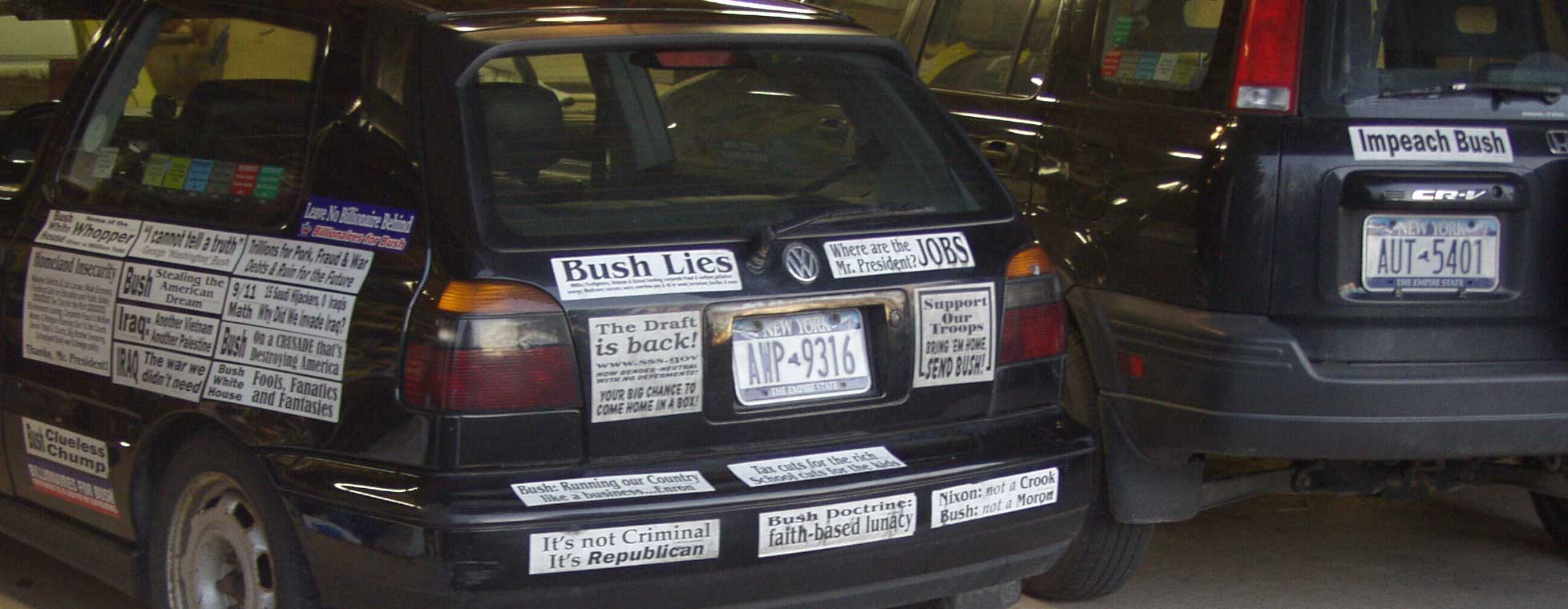
If you want a closer look, here's a higher resolution version, 120Kin size
Now that Kerry was 'defeated', I removed some so it looks a little patchy, but never fear, there's more to come. Some new favorites:
Moral Values Explained: Sex by O'Reilly, Lies by Bush, Gambling by Bennett, Torture by Gonzales.
Any Idiot can start a War
Hey George, Send Your Kids to Iraq!
The bumper stickers I make are black and white (no color), made on a normal laser printer (an old IBM/Lexmark 4029) on a special heat-resistant vinyl label material that can make it through a laser printer's fuser (where the toner powder gets melted onto the page) without turning into taffy and lunching your laster printer. They are extremely durable (after 3-4+ years, they're as good as new if a little greyed from accumulated dirt). I generate the design using Corel Draw (though any middle level or better computer art software can be used).
So, you'll need:
- A computer art software package. You will only frustrate yourself trying to do this with Word or WordPerfect. Take the plunge and get the real thing if you don't have one already. The latest level of the top contenders, Like CorelDraw or Adobe Illustrator, are very pricey and have lots of bells and whistles, more than most of us will ever need (and confusing as well). My answer is to get a back level version. You'll be getting the real thing, not a tricycle, and you'll develop some real skills. Back level CorelDraw, say version 7 or 8 (11 is current now), can be had for as little as $5. Just search in Google or a price engine. The doc will be on the CD for that price and you can get tutorials off the web.
- A B&W laser printer (Color laser printers supposedly get too
hot for the label material). This printer should be capable of
accepting manually fed individual legal-sized sheets and should be
capable of straight-through printing and print discharge.
Tray fed paper feed input and tray discharged output require 180 degree
U-turn bends that are problematic. You should be able to feed it
straight in and have it come straight out after printing. I use a
clanky old Lexmark/IBM 4029
- The label material
- A print or paper trimmer
The label material
Comes from a great operation on the West Coast, RippedSheets.com (a ripped sheet is a printing trade term...in the trade, the stock (paper, whatever) is made in enormous sheets or rolls. An intermediary jobber would cut or section those big sheets to turn out ripped sheets) that sells specialized label material.in small qunatities and sizes.https://www.rippedsheets.com
I use their #102600 Outdoor Waterproof White Vinyl Super Permanent Self Adhesive label material
https://www.rippedsheets.com/sheet-labels/102600-outdoor-waterproof-vinyl-super-permanent-labels.html
I buy "legal" size sheets, 8.5"x14". One sheet cut into thirds down the length of the long side yields three 2.75"x14" bumper stickers. Alas, it isn't cheap; the legal-sized sheets cost $3 to $6, depending on the quantity you buy. I would suggest you buy no more than you can use in 2-3 months, as the backing paper that covers the adhesive side can get difficult to pull off if it sits on the shelf longer than that.
Designing and Printing the Bumper Sticker
I'm not going to tell you how to do the artwork, but I do have some pointers- Don't try to print individual bumper stickers: they'd be too small and finicky to print well on your laser printer. Instead:
- Develop, as a single artwork file/image, three different bumper stickers (or make 3 copies of the same design) in your artwork software, based on Legal sized paper, in landscape format, like this:

- Note that:
- I've made 'cut' lines on the edge to show where to cut the sheet into thirds
- I've made very small type, say 8-10 point size, for a copyright
notice (hardly visible here)
- In the image of my car above, notice I've used the legal size sheet in different formats you wouldn't usually see in a bumper sticker...whole sheets and half sheets (either side of the license plate)
- Make yourself a 'boilerplate' or 'template' design file that
consists of nothing but
- the cutlines and
- the boundary or guide lines (these are used to keep you within the printable area of the page...no printer prints right to the edge and separate the three bumper stickers on the page
- Always begin with this blank sheet, then immediately rename it with a Save As command before you start entering your design/text
- Have some legal sized paper and do a test print on it to see if things look right, if you haven't gotten so close to an edge that the type is clipped off in the printing
- When you do your print on the actual label material:
- You must manual feed
the label material; don't
attempt to put the label material in a tray for autofeed.
- Set up the printer so the printed label comes straight out of
the printer; it should not make a 180 degree U-turn bend to got into a
tray
- make sure you've got the right side up
- Take your time and make tests!
Applying and removing your Bumper Stickers
- The bumper stickers are best applied in warm weather...warm car, warm stickers. Too cold and everything gets difficult to handle and cracks easily; too hot and everything gets stretchy and messed up. Also: wash the spot where you're going to put the sticker so that you get good adhesion and they're aren't any dirt particle bumps under the sticker. Windex works fine.
- The first couple of times you put these on, it'd help to have an extra set of hands, and always be methodical about setting things up. You have to hold the sticker with two hands, one at each end...you won't have a free hand for anything else. Once you get one end placed, you'll have a hand free (no longer holding that end) to work out the bubbles.
- Be careful and deliberate and thoughtful about actually putting
the sticker on. Consider exact placement, consider the line or
level that you are going to put it on the car...there aren't any
straight level lines on a car, rather your have to figure out what
'looks' right.
- Once it touches, it's stuck, you may be able to get it off for another try, but your may stretch or dimple it in the process. You get one clean shot...foul it up and it's really not recoverable or pretty thereafter.
- Make sure you have your 'line' right, then work from one end to
the other. Keep the far end from touching down prematurely; if it
does, you're %^$#ed. Watch out for bubbles and ripples.
Using a 'Bondo'
sgueegee/ shaper(available at an autoparts or auto body store) as you
put
the sticker down will help to prevent bubbles. Don't pull on the
material,
you'll stretch it and then you're toast.
- Full size sheets are awfully difficult to get right. You really need a Bondo sgueegee for them.
- Stay calm and know that you won't alway get it perfect.
- But...you get it on right and It Will Last!
- Getting them off: heat up with a hair dryer and pull
off. To remove any left-over adhesive, go to an autoparts or
autobody supply
house and get a can of....adhesive remover. It will remove the
goo
without removing the paint
Miscellany
- I've heard that some inkjet printer maker has color inks and sticker material. I doubt it would be as substantial and as permanent as this.
- Alcohol, gasoline or anything volatile will make the bumper
sticker 'ink' run.
- Questions, comments, suggestions and criticisms might be sent to sdean 'aht' sdean dot net. Good luck